![method grid favicon.svg]](https://help.methodgrid.com/hubfs/method%20grid%20favicon.svg)
Open My Settings
To access your settings click your profile image in the left hand bar and select my settings. In my settings you can:
- Configure your notification channel delivery settings and control which grids you want to follow (see below)
- Set your time zone and preferred date format
- Control your security settings
Notification settings
Your notifications are grouped into categories. You can decide which of these categories you would like to receive email and/or browser notifications for (in-app notifications are always on for the grids you choose to follow):
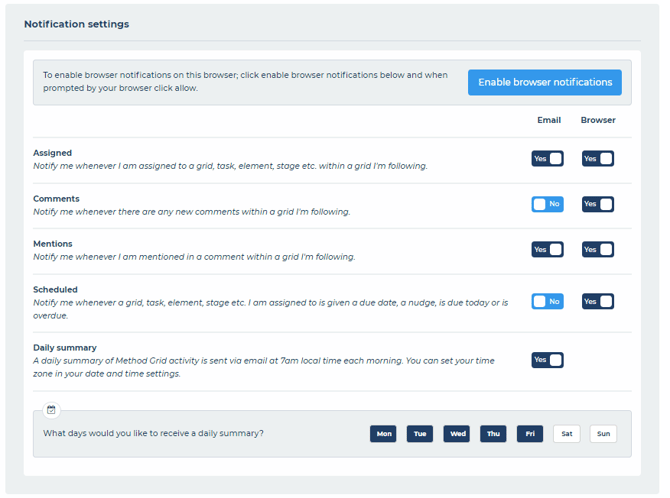
You can also turn your daily summary email on or off and specify which days you would like to receive this. The daily summary email is sent at 7am each morning and relays the activity in each of the notification categories for the previous 24 hours. You can select which days you would like to receive the daily summary by selecting the relevant days.
Note: Each member can set their own time zone to allow for international usage. Go to the Date and Time tab of the My Settings area and select your time zone from the dropdown.
Grid follow settings
Below your notification settings you will see a complete list of all the grids to which you have access. You can set each grid to either yes (follow) or no (unfollow):
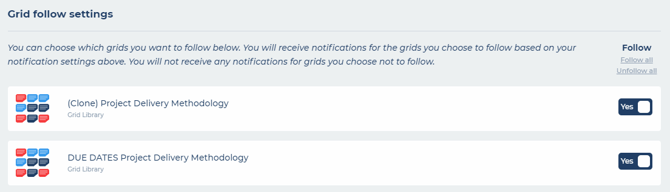
You can also choose whether to follow a grid or not within the grid by opening the grid information:
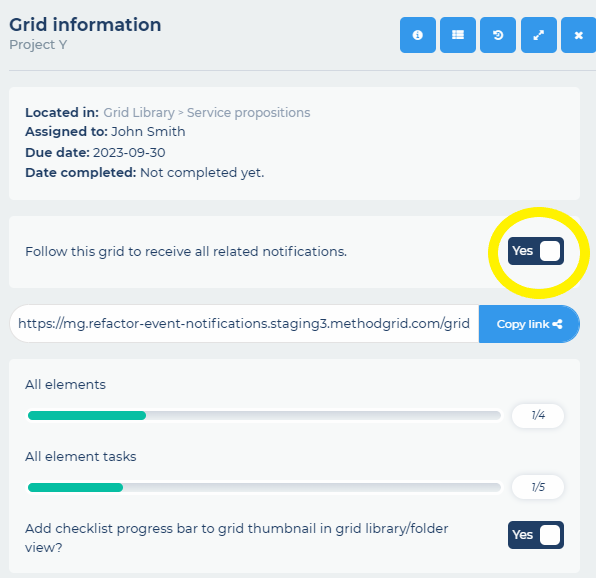
Important – you will get no notifications via any of your delivery channels, from the grids you choose not to follow. Chat integrations are unaffected by your personal grid follow settings.