![method grid favicon.svg]](https://help.methodgrid.com/hubfs/method%20grid%20favicon.svg)
Note: The video libraries and the video hosting module are a paid add-on, to enable this feature please contact us.
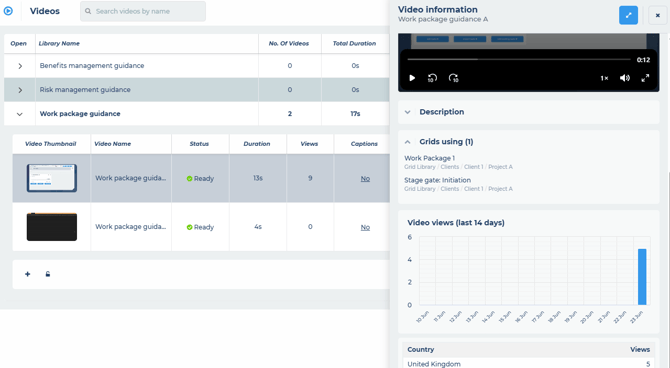
To view the top level video information:
- Open video libraries
- Each library shows you:
- The number of videos it contains
- Their total duration and views
- Who has access to the videos
- Who created it and when
- Each video in the library shows you:
- The processing status i.e. is it processed and ready to use
- The duration
- How many views it has had
- Whether it has captions (click this to manage the video's captions)
- How many grids it is used in (click this to view where it is being used)
- How big it is in MB
- The date it was added
- Who added it
To view a specific video's information
- Open the library
- Click on the video thumbnail
- The video information panel will open, in which you can see:
- Display name
- File name
- Duration
- Resolution
- File size
- Who is was added by
- A video preview (play back)
- The description (type here to add a description for the video, requires edit access to the library)
- The grids currently using the video
- A chart showing the views over the last 14 days
- A table showing the total views per country over the last 14 days